MapME
A downloadable tool for Windows
MapME
Turn Source Files Into LLM-Ready Function Maps
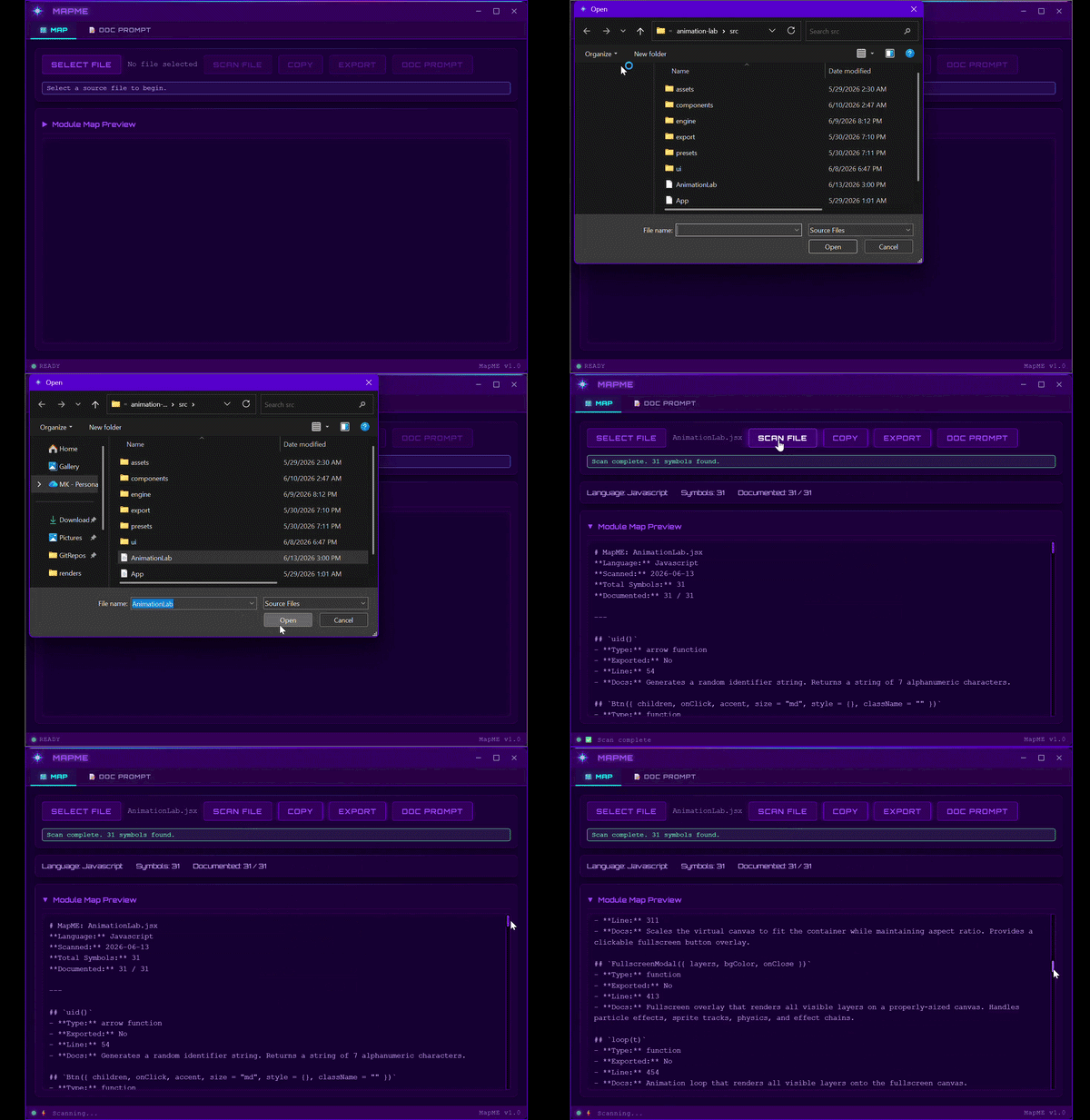
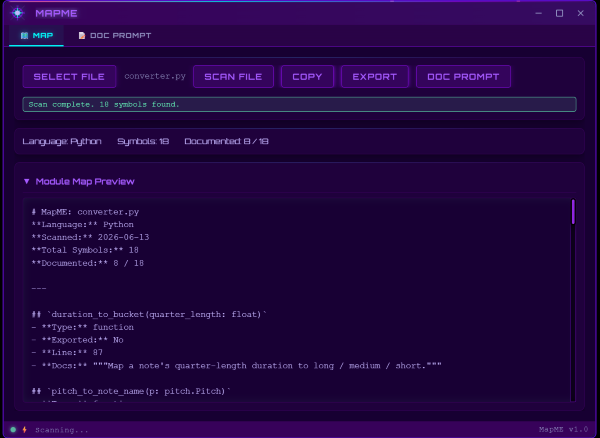
MapME is a desktop tool that scans source code and generates compact, structured function maps designed for AI-assisted development.
Instead of pasting entire source files into ChatGPT, Claude, Gemini, DeepSeek, Grok, Cursor, or GitHub Copilot, MapME extracts the information an LLM actually needs:
- Function names
- Parameters
- Return types
- Documentation comments
- Class methods
- Decorators
- Exported symbols
The result is a clean markdown document that provides project context at a fraction of the token cost of sharing raw source code.
Why Use MapME?
Large language models don't need every line of your code to understand a file.
When developers attach a 500-line Python file or a massive JavaScript module to an AI chat, most of the context window is spent on:
- Imports
- Blank lines
- Formatting
- Implementation details
- Boilerplate
What AI coding assistants really need is the structure of your codebase.
MapME extracts that structure automatically.
A large source file becomes a concise function reference sheet that is easier for both humans and LLMs to understand.
This means:
✅ Better AI responses
✅ Lower token usage
✅ Faster code reviews
✅ Easier onboarding
✅ Cleaner project documentation
Built for AI-Assisted Development
MapME was designed specifically for developers working with:
- ChatGPT
- Claude
- Gemini
- DeepSeek
- Grok
- Cursor
- GitHub Copilot
- Continue
- Aider
- Windsurf
- Other AI coding assistants
Instead of sharing raw code, generate a function map and paste it directly into your conversation.
Your AI assistant gains visibility into your codebase structure without consuming unnecessary context.
Supported Languages
MapME currently supports:
- JavaScript (.js)
- JSX (.jsx)
- Python (.py)
- HTML with embedded scripts (.html)
- Rust (.rs)
Key Features
Multi-Language Function Extraction
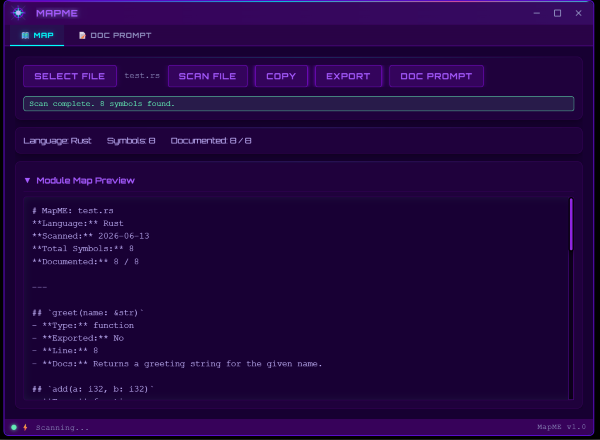
Automatically discovers functions, methods, signatures, parameters, and return types across multiple programming languages.
Documentation Extraction
Captures existing documentation including:
- JSDoc comments
- Python docstrings
- Rust doc comments
Class & Method Awareness
Methods are grouped and labeled with their owning class.
Examples:
- Modal.open()
- User.authenticate()
- Item::new()
Async & Export Detection
Highlights async functions and exported symbols so AI tools can better understand project architecture.
Python Decorator Detection
Recognizes decorators such as:
- @staticmethod
- @classmethod
- @property
- Flask routes
- FastAPI routes
One-Click Markdown Export
Generate markdown output ready to paste into any AI assistant.
Works Offline
No accounts.
No subscriptions.
No API keys.
No cloud processing.
No telemetry.
Your source code never leaves your machine.
Built-In AI Documentation Generator
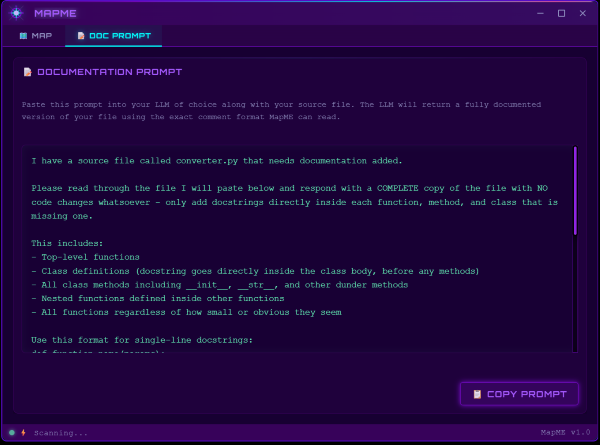
MapME includes a documentation prompt generator.
After scanning a file, MapME can create an LLM-ready prompt that instructs ChatGPT, Claude, Gemini, DeepSeek, or another AI model to:
- Find undocumented functions
- Generate missing docstrings
- Follow the exact documentation format MapME can parse
Run the documented file through MapME again and your newly generated docs become part of the function map automatically.
Common Use Cases
Give AI Better Context About Your Project
Share a function map instead of raw source files.
Reduce LLM Token Usage
Compress large files into concise codebase summaries.
Generate Documentation With AI
Identify undocumented functions and create AI prompts to document them.
Understand Unfamiliar Codebases
Instantly see the structure of a file without reading every line.
Prepare for Code Reviews
Generate a high-level overview before diving into implementation details.
Build Better Prompts
Use MapME outputs as context blocks for AI coding workflows.
Part of Context Kit
MapME is part of Context Kit, a suite of desktop tools designed to improve AI-assisted development workflows.
Context Kit includes:
BriefME
Generate structured project briefs optimized for LLM conversations.
TreeME
Create clean directory trees and project structure summaries.
WriteME
Generate developer documentation and written project context.
Together, these tools help developers provide the right information to AI assistants using the smallest possible context footprint.
Technical Details
- Built with Tauri and Rust
- Vanilla JavaScript frontend
- Static analysis only
- No code execution
- Safe for local source files
- Markdown output compatible with all major AI tools
- Supports both LF and CRLF line endings
Who Is MapME For?
- Software developers
- AI-assisted programmers
- Indie developers
- Open-source maintainers
- Technical writers
- Engineering teams
- Anyone using LLMs to understand or modify code
Keywords
AI coding assistant, codebase context tool, function signature extractor, source code analyzer, LLM workflow tool, Claude code context, ChatGPT code context, Gemini coding workflow, DeepSeek developer tools, Grok coding assistant, Cursor workflow tools, GitHub Copilot context optimization, function map generator, AI documentation generator, Python documentation tool, JavaScript code summarizer, Rust code analysis, token reduction tool, prompt engineering for developers, codebase mapping software.
Stop pasting entire source files into your AI chats.
Generate a function map instead. Give your AI assistant the context it actually needs.
Download
Click download now to get access to the following files:
Leave a comment
Log in with itch.io to leave a comment.